
ReRender vs. Rendair
See how ReRender and Rendair AI render the same design. With ReRender Pro, you can explore as many views and revisions as you need for $45/month on monthly billing.
Start renderingFrom the first render to the client presentation
Start with a view from a project you know. See how ReRender handles the materials and lighting, then explore the revisions your client wants to see.

Turn your 3D model view into a photorealistic render
Upload a screenshot of your model view to ReRender. See how sunlight falls across the facade, shadows give openings depth, and reflections bring the glazing to life.
One model view, two rendering results
We gave both tools the same 3D model view and the same prompt. In this scene, ReRender comes closer to an architectural photograph. Look at the tree reflections in the upstairs windows and how the front steps fade into shadow.

Original 3D model
The front elevation establishes the rooflines, full-height windows, and timber screen beside the entrance.
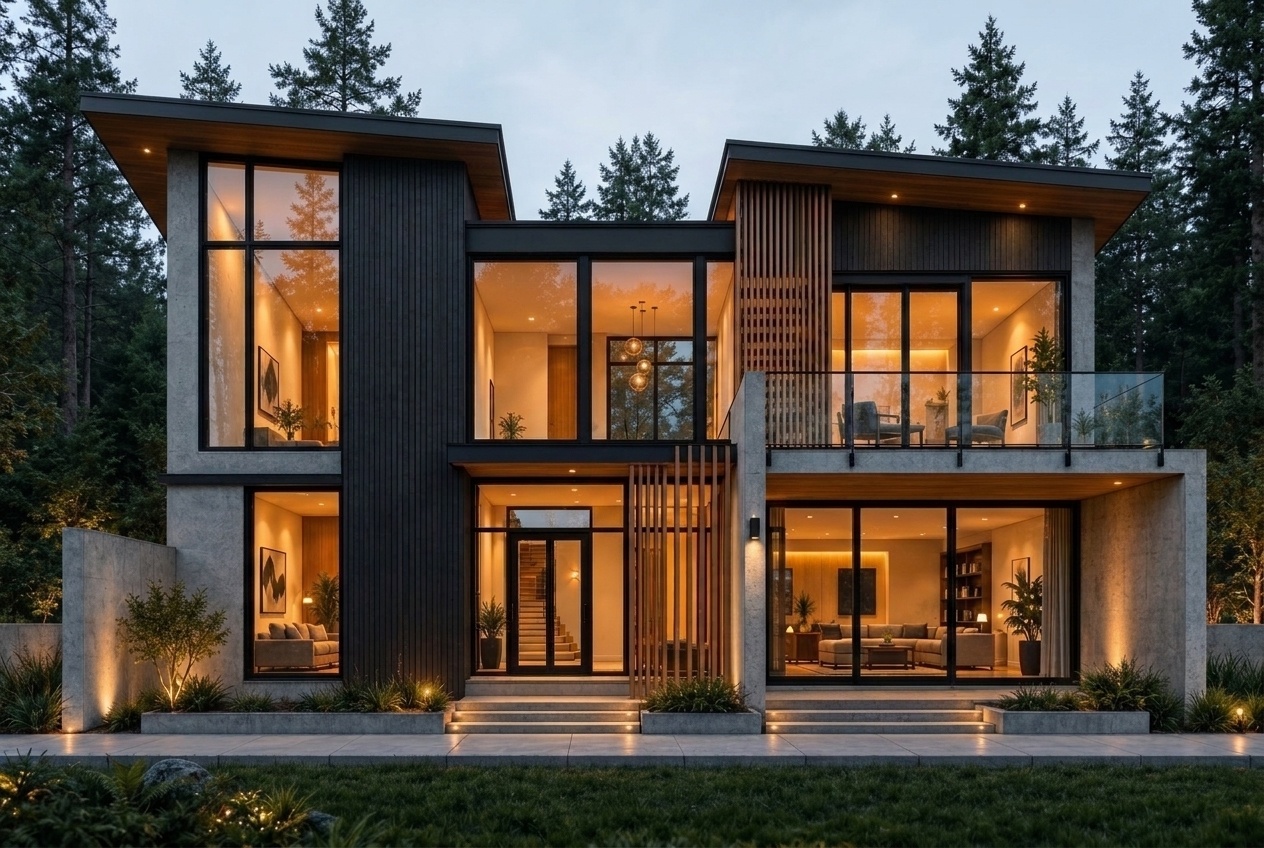
ReRender result
Reflections of the pines soften the warm glow behind the glass. Subtle lighting along the steps gives the entrance depth and makes the house feel grounded in its woodland setting.

Rendair result
The vivid blue sky, evenly lit rooms, and bright strips along the steps give this version a more staged, slightly artificial look.
Unlimited renders with ReRender Pro for $45/month
ReRender Pro costs $4 less per month than Rendair Pro on monthly billing. If you revisit the same design through several rounds of client feedback, ReRender Pro includes unlimited renders for those revisions.
ReRender Pro · $45/month
Unlimited renders on monthly billing. Explore another finish, camera angle, or lighting option without calculating a credit cost for each revision.
ReRender Pro · Annual plan
Pay $450 for the first year and save $90 compared with 12 monthly payments. Unlimited renders, watermark-free downloads, and commercial usage rights are included.
Rendair Pro · $49/month
Even at $49/month, Rendair Pro puts your model renders in a priority queue and meters them against 1,500 monthly credits. Higher-cost settings use up that balance faster, and extra credits cost more.
Explore more architectural renders
Three renders explore light at different scales, from the weave of a rug to the depth of a balcony and the reflections across a glass tower.


Choosing ReRender for your project
Compare the Pro plans, try ReRender on a model you know, and see what’s included for client work.
How does ReRender Pro compare with Rendair Pro?
On monthly billing, ReRender Pro costs $45 and includes unlimited renders. Rendair Pro costs $49 and includes 1,500 monthly credits and two seats. With ReRender Pro, you can revise a model view as often as you need without budgeting credits for each render.
Can I test ReRender with my own 3D model?
Yes. Upload a screenshot from SketchUp, Revit, Rhino, or another 3D tool. The free plan includes 3 renders daily, so you can see how ReRender handles your design before subscribing. Free renders are watermarked and for non-commercial use.
Can I use Pro renders in paid client work?
Yes. ReRender Pro includes watermark-free downloads and commercial usage rights. Use your renders in client presentations, design proposals, and your studio portfolio.
See your own design in ReRender
Choose a sketch or model view you know well. Use your first free render to see how the geometry, materials, and light come through.
Render your design